The speaker factory
This page preserves the factory methods and their historical measurements. Prices and results belong to the named route and date; they are not a current per-minute promise. Choose the model, runner and hosting separately, and compare total finished-output cost including retries.
 Choose a video production route
Since 21-08-2026, a speaking take costs nothing. They are born in the Grok web session on Frank's own SuperGrok subscription, 30 dollars a month, with no per-second bill. Thirty-two takes for two pages were made in one night for zero, against the 13.19 dollars already spent on the paid interface for the first twelve.
The session drives his Chrome itself: it opens grok.com, writes the order, waits, downloads the files and measures them. He touches nothing. What is really spent is a weekly pool shared with chat, and a rejected take spends it too.
The paid route stays as the fallback when the pool is empty: the grok-imagine-video-1.5 API at 0.081 dollars a second. Recipe, thresholds and the ten traps already paid for: the /grok-speaker skill.
Our own production line for the moving speaker's video. Paid quality, centimes per sentence. These pictures are the real frames of Valentina's presentation, made today.
To set up your own factory: give your Claude the recipe, then ask
First, once per machine. Your Claude does not know this recipe until you give it to it. The recipe is a small file called build-your-own-factory. Install it with one command in your Claude Code:
npx skills add gfrankgva/studio-skills
Or take the file yourself: 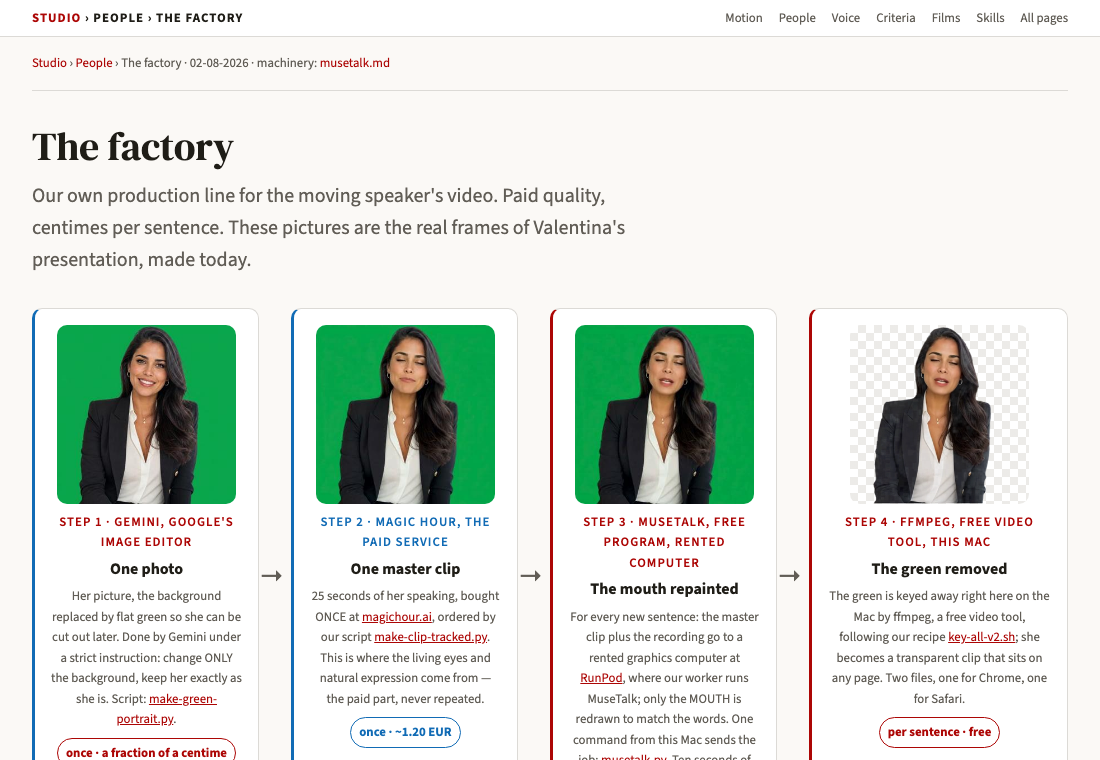 download build-your-own-factory and put it in
 ~/.claude/skills/build-your-own-factory/SKILL.md. More ways, and what else is in the pack: further down this page.
Then just ask, in your own words: « Set up my own talking-video factory. »
The best-looking parts are born, not repainted
Frank's verdict, 07-08-2026, on rendered clips, three times in one evening. He rejected the enlarged-and-grained finish twice ("both are bad"), then chose the raw untouched clips ("this one is definitely the best… it's so wonderful to see"), then rejected the repaint on a big master too ("the mouth makes strange moves"). So the ranking of what his eye likes is the exact inverse of how much we process a clip.
What that means for this page. The chain below is still true and still cheap, and it stays the route for long narration, for a person we filmed rather than invented, and for anything where a hundred sentences make paying per clip absurd. But when a page needs eight beautiful parts, we now buy each one born: the engine speaks that exact line, at its own size, and the only step after birth is removing the green. Roughly $1 per part, bought once, versus centimes — the difference is what his eye keeps choosing.
Two things a born part needs. Its clip is capped at 15 seconds, so a long paragraph is cut at its natural pauses and bought as two or three takes, each with a breath of runway before the first word — otherwise she rushes, or the first word is clipped. And every take is verified before it counts: the words transcribed and compared to the script, the pace measured (1.9 to 2.1 words a second is the approved range), the transparency proven on a decoded frame. Full rules: criteria 20 and 21.


 RunPod, where our worker runs MuseTalk; only the MOUTH is redrawn to match the words. One command from this Mac sends the job: musetalk.py. Ten seconds of machine per sentence.
per sentence · under a centime
RunPod, where our worker runs MuseTalk; only the MOUTH is redrawn to match the words. One command from this Mac sends the job: musetalk.py. Ten seconds of machine per sentence.
per sentence · under a centime

Step 2, two routes to the master clip
The master clip is the one paid step, bought once per person: the seconds of speaking that carry the living eyes. Proven again 03-08-2026, on the Vox Populi speaker Hélène.
Image to video from the green-screen portrait, on Frank's own paid Gemini key (GEMINI_PAID_KEY). No separate account, no credits to buy, about 40 seconds of wall clock for an 8-second, 720p clip, called through predictLongRunning. Script, kept as the record of the exact call: make-veo-master.py (swap its MODEL to veo-3.1-fast-generate-preview for the price below; the recorded run used standard).
Billed per second at Google's list rate. The Fast model, veo-3.1-fast-generate-preview, costs $0.10/s at 720p: an 8-second master is $0.80, cheaper than Magic Hour, the recommended default since MuseTalk repaints only the mouth afterward and the master only has to supply the living eyes and the motion. The standard model, veo-3.1-generate-preview, costs $0.40/s at 720p: the same 8 seconds is $3.20, kept for a hero clip seen full screen.
Two traps found on Hélène's clip, both costly: the aspect-ratio choice adds black bars that must be cropped off (ffmpeg's cropdetect), and the portrait prompt must name the person's garment plainly, or the image model repaints it. A terracotta linen shirt became a mustard knit when the garment went unsaid, and the wasted clip plus the corrected one together cost about $6.40 (two 8-second standard clips). Name the garment and settle the framing before spending.
The route Valentina's master came from. Needs its own account and its own credits at magichour.ai: 4,000 credits = $10, about 3 masters, or the Creator plan at CHF 8 a month, 120,000 credits a year. Ordered by make-clip-tracked.py.
Grok Imagine is now the first route (Frank's verdict, 05-08-2026). Tested on Valentina's own green portrait against the paid clip: more expressive — that is why it is first, not the price. Per second it costs about $0.081 (measured: $0.65 for 8 s), roughly 1.7× Magic Hour's ~$0.047, and below Veo fast's $0.10. Green kept perfectly flat. One quirk: it returns a square frame whatever ratio you ask for.
The master clip is never skipped. The free factory alone, animating a still with LivePortrait, gives flat, dead eyes: no living gaze, no real blink, because nothing in that route ever recorded one. Frank rejected exactly this result on Hélène, 03-08-2026: "the two videos are very bad." What was tried, and renamed rather than reused so nothing stale comes back by accident: how-it-was-made.md.
Why it costs almost nothing
A paid service charges about 2.40 EUR per minute because you pay for its software and its computer bundled together. The factory splits them:
LivePortrait gives a photo quiet life: breathing, a slow blink — her resting state. MuseTalk repaints only the mouth to match a recording. Both are open programs; they cost nothing.
AI video needs a special graphics computer (a GPU). RunPod rents one for about 0.34 USD an hour, billed only while it computes. A sentence takes about ten seconds of machine.
And two economies on top: the factory buys the expensive thing once (the master clip with the living eyes — the factory alone invents flat, dead eyes, so we do not let it invent), and it studies her face once (about two minutes, then remembered in a cache; every later sentence renders in ten seconds).
The numbers, measured
| Thing | When | Cost |
|---|---|---|
| Master clip, Veo 3.1 Fast on our own Google key | Once per person | $0.80 (8 s, 720p, $0.10/s) |
| Master clip, Veo 3.1 standard (hero clips) | Once per person | $3.20 (8 s, 720p, $0.40/s) |
| Master clip, Magic Hour (still valid) | Once per person | ~1.20 EUR a clip, or CHF 8/month Creator plan |
| This session's Veo spend, one clip wasted on the wrong garment and framing, one corrected | 03-08-2026 | ~$6.40 (two 8 s standard clips) |
| Face study (preparation, then cached) | Once per person | ~2 minutes of machine, ~2 cents |
| One sentence of finished video | Every time | ~10 s of machine, under a centime |
| Valentina's 5-part presentation of the Speakers page | Today | ~2 cents total |
| The same minutes at the paid service | — | ~2.40 EUR per minute |
Give it to a colleague
This whole page is a skill — a small file of instructions their own assistant reads and follows: your own production line, centimes a minute instead of euros. They install it once; after that they simply say what they want, in their own words, and their assistant does it — on their own machine, with their own accounts, nothing of Frank's.
One command, in their Claude Code:
npx skills add gfrankgva/studio-skills
That installs this skill together with the studio's six others.
Or take the file itself: download the skill (one file, put it in their ~/.claude/skills/build-your-own-factory/) · read it on GitHub · the whole pack.
Without the skill it still works — the method on this page still works by hand. The skill only means their assistant already knows it.
Where the machinery lives
| What | Where |
|---|---|
| The master clip script (Veo 3.1, image to video) | make-veo-master.py, full route with commands and costs: how-it-was-made.md |
| The command and the setup (one line per sentence) | claude-code-video-toolkit/docs/musetalk.md |
| The worker code on the rented computers | github.com/gfrankgva/musetalk-worker |
| The standing rule (check the rented-GPU path before paying per minute) | reference-rented-gpu.md |
| The cut-out recipe (green removal, the two files) | key-all-v2.sh |
| The whole speaker recipe this factory serves | site-speaker skill ·  the Speakers page the Speakers page |